There are so many opportunities that I can get here that I am not able to get anywhere else.

A quick weekly bite on the apps, trends, and tools your teen is using — plus tips, resources, and events to help you stay in the know.
This week: The biggest iPhone parental-controls update in years
On September 14, 2026, Apple’s iOS 27 rebuilt Screen Time from the ground up. If your teen has an iPhone and you’ve been meaning to look at the settings again, now is a good time.
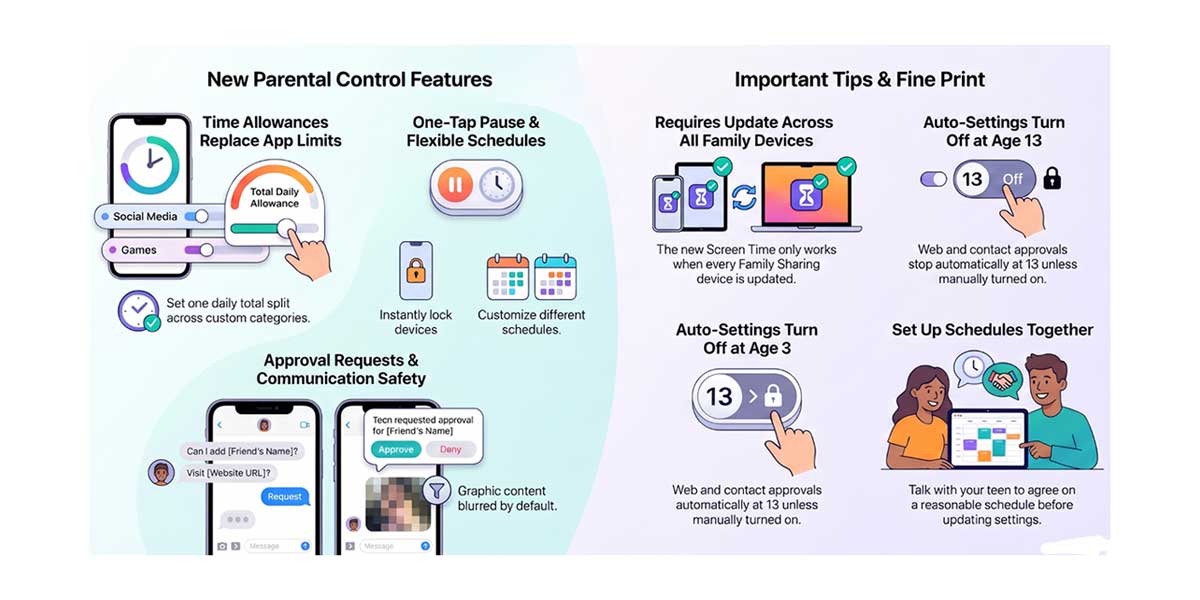
Heads up:
Try this: Apple’s family guide, made with the American Academy of Pediatrics, suggests talking with your teen before you change any settings. Before Thanksgiving break, ask, “What would a reasonable weekday schedule look like to you?” and then set it up together.
Android family? Explore Google’s Digital Wellbeing and parental controls.